 |
ACTS
Experiment-independent tracking
|
|
ACTS
Experiment-independent tracking
|
This page is the canonical reference for the ACTS Examples material mapping chain, and a step-by-step guide to producing a map for a detector of your own. It assumes you have the detector described both as an ACTS Acts::TrackingGeometry and as a detailed simulation geometry that Geant4 can navigate (typically DD4hep, which gives you both from one source).
For the conceptual picture — what the mapping does and why it is structured the way it is — see Material mapping.
The chain is:
Only the designation step is detector-specific work, and it is the only step that differs between Gen1 and Gen3. The rest is running three scripts:
End to end for the Open Data Detector, which already has its surfaces designated and so skips step 1:
The rest of this page walks through the same chain for a detector that does not have a map yet.
Mapping only writes material onto surfaces you have explicitly designated as material-carrying. A fresh detector designates nothing, so this is where you start.
How you designate depends on which geometry generation you build with, and it is the only part of this guide that does. Steps 2 to 5 are identical either way.
This writes geometry-map.json in the current directory (among other outputs). The relevant part is in runGeometry() in Examples/Scripts/Python/geometry.py, which extracts assignments with Acts::TrackingGeometryMaterial::fromGeometry and writes them using Acts::TrackingGeometryMaterialJsonConverter::toFile.
Point the script at your own detector by replacing the getOpenDataDetector() call at the bottom of the file.
geometry-map.json has one entry per surface, which for a real detector is thousands of entries. writeMapConfig.py collapses it into one representative entry per surface category per volume:
In config-map.json, for every surface category you want to map:
A homogeneous surface is 1 x 1. Start coarse: bins with no hits produce no material, and a fine binning with too few recorded tracks gives you a map full of holes.
geometry-map.json is now your mapping configuration: the same file you pass as --matconfig in step 3.
In Gen3 the geometry is built from a blueprint, and material is designated as part of that construction rather than annotated onto the result. Steps 1a to 1d do not apply: there is no geometry dump to edit, and no --matconfig file. You edit the blueprint code instead.
Acts::BlueprintNode::addMaterial inserts a Acts::MaterialDesignatorBlueprintNode, which wraps exactly one child and marks up that child's volume faces as it is connected:
The two-axis form of Acts::MaterialDesignatorBlueprintNode::configureFace attaches a Acts::ProtoGridSurfaceMaterial — a binning specification with no content, which is exactly what the Gen1 JSON route produces via Acts::ProtoSurfaceMaterial. It is the direct equivalent of setting "mapMaterial": true plus a bin count, and it is what you want if you intend to run the mapping.
There is a second form taking an Acts::ISurfaceMaterial directly:
That assigns real material immediately, so there is nothing to map — useful for a beam pipe or a support tube whose material you already know. GenericDetector uses this throughout (Examples/Detectors/GenericDetector/src/GenericDetector.cpp).
These snippets are taken from docs/examples/material_designation.cpp, which is compiled as part of the docs-examples target, so they cannot drift from the API.
For a complete, real detector exercising this end to end — beampipe, passive support structures, barrel/endcap sensitive layers and calorimeter material collectors all designated during construction — see Plugins/DD4hep/src/OpenDataDetectorBuilder.cpp. It is the Gen3 ODD's blueprint construction and the most complete worked example in the codebase.
Faces are named per volume-bounds type: Acts::CylinderVolumeBounds::Face (OuterCylinder, InnerCylinder, PositiveDisc, NegativeDisc), Acts::CuboidVolumeBounds::Face (NegativeXFace, PositiveXFace, …) and likewise for trapezoid and diamond bounds.
Things to know before you use it:
configureFace marks up faces of a blueprint node that already exists. Two helpers create such nodes in the first place, for volumes that carry material but have no sensitive detector elements of their own:
The material collector is currently DD4hep-only: the TGeo blueprint backend (ActsPlugins::TGeoBlueprintBuilderBackend) has no material-collector helper yet.
Once construction is done the two generations converge completely. The designated material sits on ordinary surfaces, so hasMaterial() is true, trackingGeometry.extractMaterialSurfaces() collects them, and Acts::BinnedSurfaceMaterialAccumulator consumes Acts::ProtoGridSurfaceMaterial alongside Acts::ProtoSurfaceMaterial. Steps 2 to 5 below are unchanged — just omit --matconfig in step 3, since the geometry already carries the designation.
The Acts::AxisSpec overloads of Acts::MaterialDesignatorBlueprintNode::configureFace accept an optional trailing key for proto materials. Existing calls without a key continue to use geometry identifiers:
In Python the argument is named materialKey. Keys identify individual surface assignments, not material compositions. They are case-sensitive, must be nonempty when supplied, and must be unique among the material surfaces of a geometry. Choose names independent of traversal order and generated geometry IDs. Repeated configuration of the same proto-designator face is an error.
Proto materials carry the key. Mapping and loading discover it by downcasting the surface's Acts::ISurfaceMaterial; Acts::Surface has no key API or storage. Standalone proto-material and surface serialization preserve the key while the placeholder is attached. Loading replaces the placeholder with real material and consumes this identity. To apply another keyed map, rebuild the geometry with its designators first. Write or combine keyed maps using Acts::TrackingGeometryMaterial, rather than reconstructing keys from decorated surfaces.
Acts::BinnedSurfaceMaterialAccumulator validates identities before mapping: it rejects duplicate keys, distinct surfaces with the same geometry ID, and merged-material markers. Repeated visits to the same shared surface are allowed. The accumulator finalizes keyed assignments separately from the legacy ID-indexed assignments in Acts::TrackingGeometryMaterial::keyedSurfaces. Acts::MaterialMapper::finalizeMaps returns those maps. Registry state and identity checks remain internal to the accumulator implementation.
For a completed geometry, use TrackingGeometryMaterial::apply (maps.apply(geometry) in Python), or the overload taking a span of mutable surfaces. These format-independent Core operations validate the selected geometry's key/ID uniqueness and resolve all assignments before updating surfaces. The individual-surface apply(surface) overload performs lookup and material assignment but cannot check uniqueness across other surfaces.
Acts::TrackingGeometryMaterialJsonConverter reads versioned JSON/CBOR into these maps. Call converter.fromFile(path).apply(geometry) in C++ or Python to apply them to a completed geometry. Python also provides acts.IMaterialDecorator.fromFile(path) for construction-time decoration. The deprecated JSON decorator remains available for legacy files, with a Python deprecation warning.
For the serialized representation, see Legacy material map JSON format.
Shoots geantinos through the detailed geometry and records what they traverse, into mydet_geant4.root. -n is events, -t is tracks per event, so the above is a million tracks; --eta-range and --phi-range restrict the solid angle.
This step is independent of your surface choices — you only need to redo it if the detailed geometry changes, not when you retune binning. It is by far the slowest step, so record generously once and reuse the file.
For a DD4hep detector, the recording can also run directly in ddsim, on the same Geant4 geometry DDG4 builds for the full simulation. Two DDG4 actions in the ActsPluginDD4hepGeant4 library do this: the ActsMaterialRecorder stepping action collects the material tracks, and the ActsMaterialTrackWriter event action writes them in the same file format as above. The library is built when both the DD4hep and the Geant4 plugins are enabled and DD4hep comes with DDG4. With it on LD_LIBRARY_PATH, e.g. after sourcing this_acts.sh:
The steering file shoots 1000 geantinos per event, uniform in \(|\eta| < 4\); the gun can be adjusted on the command line, e.g. with --gun.multiplicity, --gun.etaMin and --gun.etaMax. With --numberOfThreads, which ddsim offers from DD4hep 1.38, all threads write into the single output file. Every simulated track gets an entry, also if it crosses no recorded material.
The mapping assigns every recorded step to a surface, so material beyond the outermost material surfaces, e.g. in the calorimeters, ends up on them. To avoid this, limit the recording to a cylinder around the beam axis, e.g. at the calorimeter face, with --outputConfig.recordingMaxR, --outputConfig.recordingMinZ and --outputConfig.recordingMaxZ in mm. The z range does not need to be symmetric, and a bound that is not given does not limit the recording. Tracks are stopped where they leave the cylinder, and the step that crosses its boundary is cut there, which also makes the recording faster.
To compare two recordings track by track, they need the same geantinos. For example, add a HepMC3Writer for the generated event to material_recording.py, and replay the resulting HepMC3 file in ddsim with --inputFiles instead of the particle gun, by setting SIM.enableGun = False in a copy of the steering file.
--matconfig loads your configuration through acts.IMaterialDecorator.fromFile(), which puts an Acts::ProtoSurfaceMaterial (a binning specification with no content yet) on every surface you enabled. On a Gen3 geometry, omit --matconfig — the blueprint already designated the surfaces, and the decorator would be ignored anyway. The script then reads those surfaces back out:
and hands the resulting list to Acts::IntersectionMaterialAssigner and Acts::BinnedSurfaceMaterialAccumulator. That list is the only geometry input the mapper gets, which is what makes it generation-agnostic.
Outputs:
| File | Contents |
|---|---|
| mydet_material_map.json | the material map, human-readable |
| mydet_material_map.root | the same map, for production use — Gen1 only, see below |
| mydet_material_mapped.root | recorded interactions that found a surface |
| mydet_material_unmapped.root | recorded interactions that did not |
| mydet_material_eta_distance.svg | diagnostic plot: mapping distance vs. η |
_unmapped.root is the one to look at when something is wrong. A large unmapped fraction means the material had nowhere to go — see Troubleshooting.
Substitute your own detector and the map you just produced. This snippet comes from docs/examples/test_material_map.py, which runs as part of the pytest suite.
.json, .cbor and .root are all accepted. This is exactly how the Gen1 ODD picks up data/odd-material-maps.root by default.
For the Gen3 ODD, loading works slightly differently from the generic snippet above. getOpenDataDetector(gen3=True, materialDecorator=...) (Python/Examples/python/odd.py) first builds the detector without material, then pulls materialDecorator.materialMaps out of the given decorator and applies it to the constructed geometry with TrackingGeometryMaterial::apply(), now that geometry identifiers are assigned. This replaces the designated proto material in place. Unlike Gen1, there is no default material map for the Gen3 ODD — it is only applied when a decorator is explicitly passed in. The shipped data/odd-material-maps.root cannot be used for this: it is an unkeyed map, indexed by the Gen1 geometry's own identifiers, while Gen3 requires a matching keyed entry for every designated face and has no ID fallback (see above) — applying it raises Missing material for key '...'. To get a map that actually works for Gen3, run steps 2-3 above (material_recording.py + material_mapping.py, both default to Gen3) to produce a fresh _map.json, and pass that.
This re-records material, now from your mapped map instead of from Geant4, so you can compare the two. -p additionally runs a real propagator with a navigator and writes mydet_validated_propagated.root.
Comparing the default and -p outputs is worth doing: the default collection is navigation-independent, so a difference between them is a navigation problem (material the navigator does not reach), not a mapping problem.
To compare against the Geant4 input:
Examples/Scripts/MaterialMapping/material_mapping_check.py -i mydet_material_mapped.root plots how far each interaction was moved to reach its assigned surface, which is the quickest way to spot material being attached to the wrong thing.
What you are aiming for looks like this — Geant4, mapped, validated and propagated profiles of t_X0 against eta, with a ratio panel:
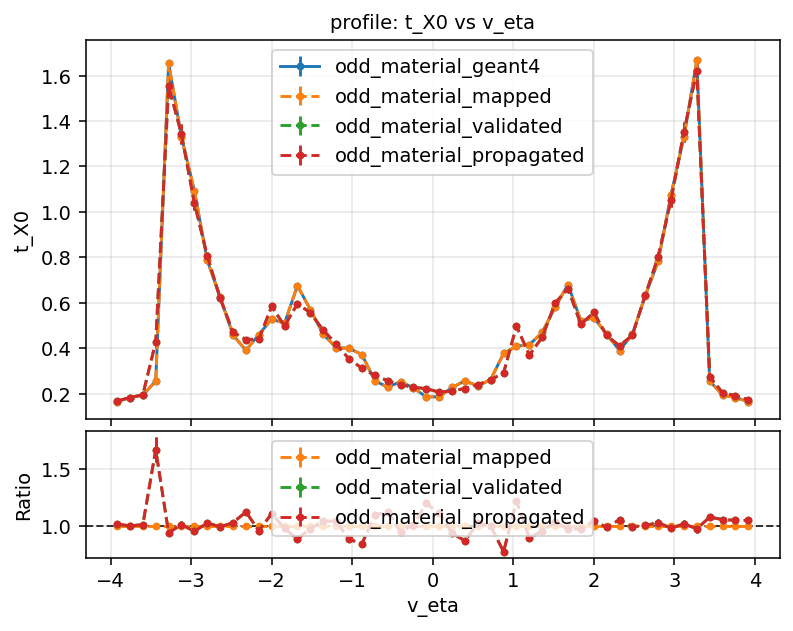
Iterating on binning does not require re-recording. Edit config-map.json, re-run configureMap.py and step 3 against the same recorded file.
Rules of thumb:
These are properties of the current navigation-less mapper, not of your setup.
Volume material is not produced. Acts::MaterialMapper retrieves volume assignments from the assignment finder and then discards them; only surface material is accumulated, and finalizeMaps() returns an empty volume map (Core/src/Material/MaterialMapper.cpp). ACTS currently has no way to map volume material.
mappingType is not honoured. The "mappingType" key round-trips through the JSON and is stored on the material, but the current assignment does plain nearest-intersection matching — its own comment says "no pre/post matching" (Core/src/Material/MaterialInteractionAssignment.cpp). PreMapping, PostMapping and Sensor have no effect. To steer assignment, use the globalVetos, localVetos and reAssignments hooks in Acts::MaterialInteractionAssignment::Options.
Everything lands in _unmapped.root. Nothing was designated. On Gen1, confirm that geometry-map.json actually contains "mapMaterial": true somewhere — if you forgot processNonMaterial=True in step 1a, or forgot to run configureMap.py in step 1d, the file will be syntactically fine and semantically empty. On Gen3, check that you are not passing --matconfig and expecting it to do something: blueprint geometry ignores decorators, so the designation has to be in the blueprint itself.
Gen3 construction throws on a material merge. A designated portal face is being merged during container stacking. Move the designation outward to the enclosing container's face rather than reaching for keepGoingOnMaterialMergeFailure, which discards the material.
The map is full of empty bins. Too fine a binning for the number of recorded tracks. Coarsen it, or record more.
Material appears on the wrong surface. Expected when candidate surfaces are close together: assignment picks the nearest intersection with no notion of "before" or "after". Use material_mapping_check.py to see the assignment distances, and the veto/re-assignment hooks to correct specific surfaces.
Validation disagrees with Geant4, but only with -p. That is navigation, not mapping. The mapped material is fine; the navigator is not finding all of it.
Running --gen1 against a detector with a calorimeter. Gen1 geometry has no calorimeter catch-all collector surface — that is a Gen3-only addition, see Designating material in Gen3 — so calorimeter material has nowhere correct to go and gets misattributed to the nearest tracker surface instead. The ODD scripts handle this automatically (buildCalorimeter=gen3 in getOpenDataDetector, Python/Examples/python/odd.py); if you adapt them for your own Gen1 script, either disable the calorimeter or add an equivalent collector.
Python/Examples/tests/test_material_mapping.py runs the whole chain against the ODD and is the most reliable executable reference for it. The ODD itself ships a finished map at data/odd-material-maps.root.
The chain is additionally guarded by tests in Python/Examples/tests:
Those tests are the executable reference for expected output structure and for regression tracking. If this page and they disagree, they are right.
 1.15.0